01
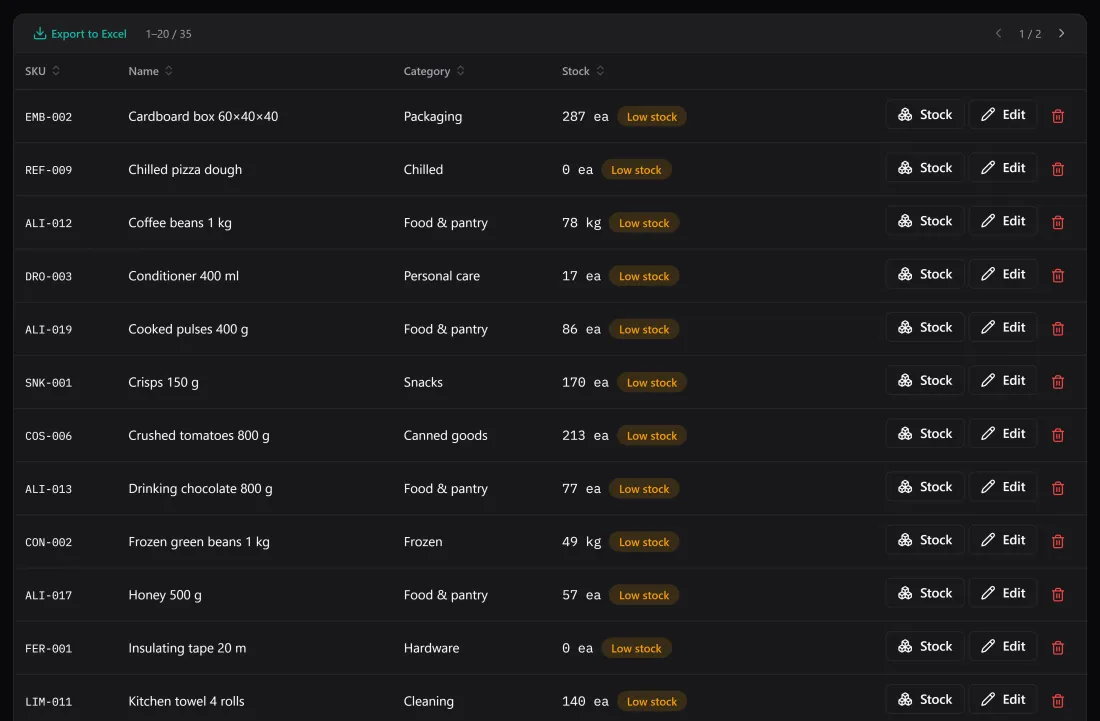
What do I need to reorder?
Give each product the minimum you never want to fall below. One filter shows everything under it, with the shortfall spelled out — no sorting, no conditional formatting to maintain.
Windows desktop · pay once · works offline
BasicInventory is inventory software for small warehouses and shops. Products, locations, lots and expiry dates, with a recorded movement behind every change. It runs on your own PC and your data never leaves it.
Price today Today's price. It rises every five licences sold, up to €19.99 — and your licence keeps the price you paid, for good.
Windows 10 & 11 · buy and install from the Microsoft Store in one step.

What nothing else at this price does
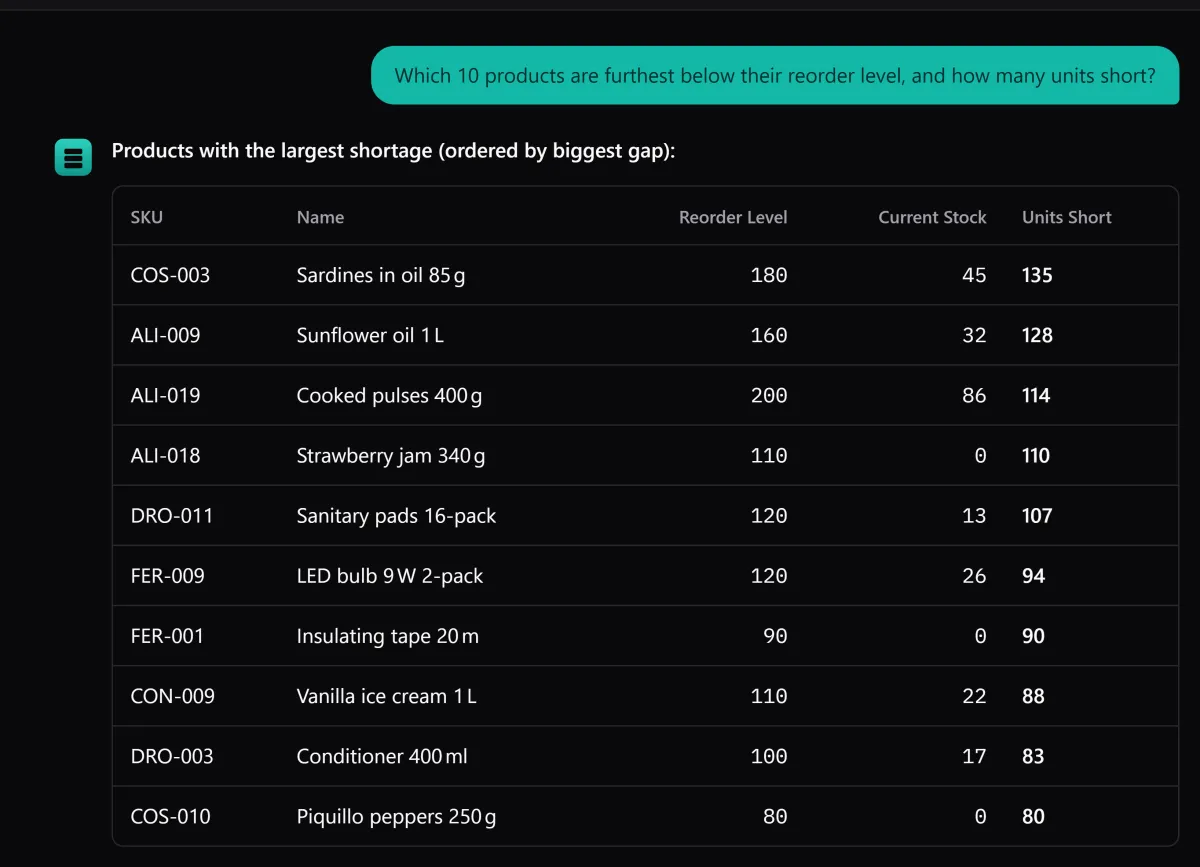
Inventory software at this price gives you lists and filters. This gives you both, and an assistant that answers in plain language from your own data — which items are below their reorder level, what expires this month, what is sitting in aisle D.
What it does
Not an ERP and not a to-do list with quantities. The handful of things stock control actually needs, built so they hold up after a year of use.
Aisle, column and height — the address of the thing, not a note in a cell.
Walk your warehouse in 3D and click any shelf to see which location it is.
Per product, only where you need it — and the list tells you which lot to move first.
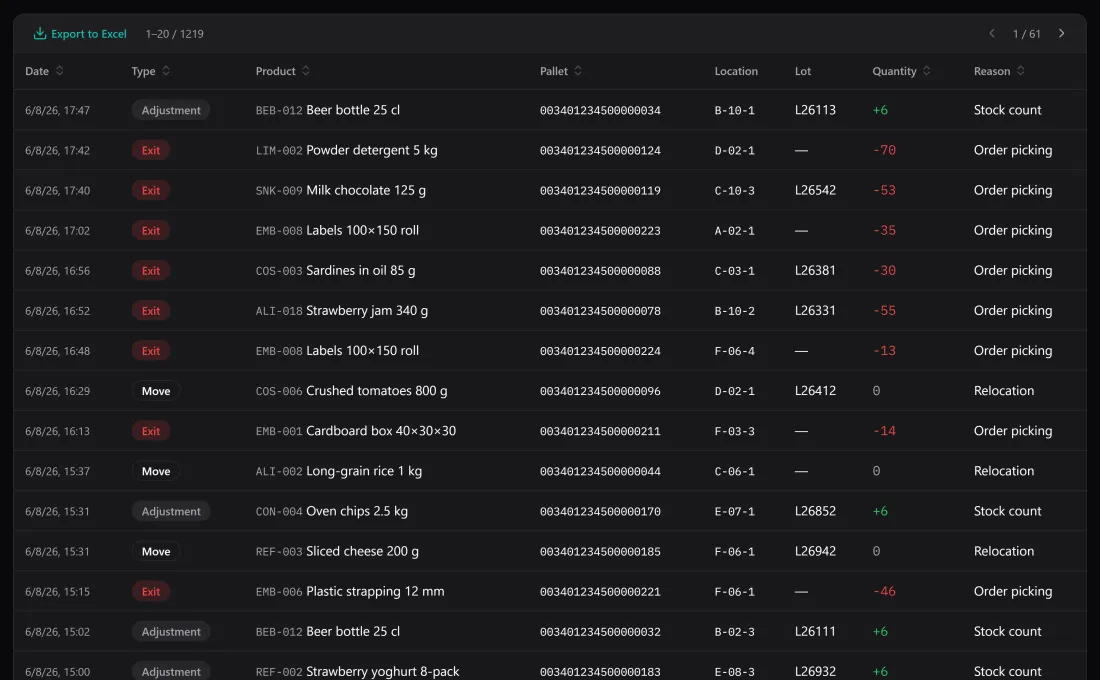
Entries, exits, adjustments and moves — dated, with reason, lot and location.
The same data, shown as stock per location or as full pallet detail.
Ask about your own stock in plain language. Optional, with your own provider key.
One file, on your machine. Backups on demand, on close, and restorable from the app.
In practice
Each screen exists because somebody has to answer something before lunch.
01
Give each product the minimum you never want to fall below. One filter shows everything under it, with the shortfall spelled out — no sorting, no conditional formatting to maintain.
02
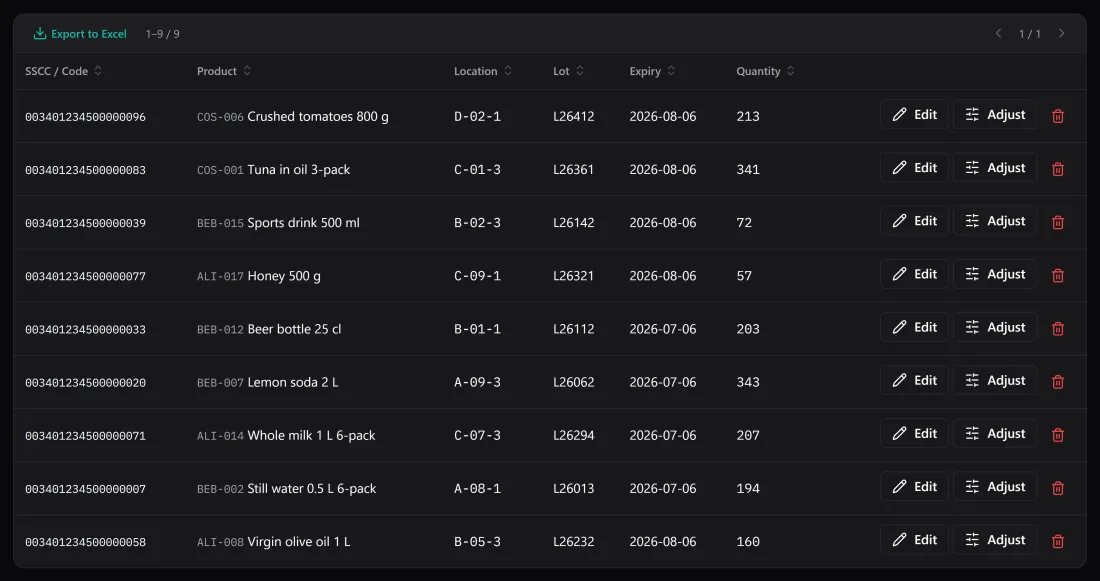
Expiry dates live on the stock itself, not in a column somebody has to remember. Filter to what is close to its date and every line comes with its lot and its location, so the list you read is already the list you can walk.
03
Because stock is the sum of its movements, there is always something to read: what came in, what left, what was counted again, and what moved shelf — each with a date, a reason, a lot and a location.
Coming from a spreadsheet
It got you here, and for a hundred rows it is hard to beat. The trouble starts when the file has to remember things people forget.
| In a spreadsheet | In BasicInventory |
|---|---|
| Stock is whatever the last person typed | Stock is what the recorded movements add up to |
| A location is free text: “shelf B”, “B”, “B-2” | Aisle, column and height — filterable, always written the same |
| Expiry lives in a column somebody has to sort | Counted on the dashboard, with the lot and the location of each line |
| The history is the version you saved over | Every change is a movement with date, reason, lot and location |
| One inserted row breaks a formula silently | There are no formulas to break |
Who buys it
The same application, set up differently. Pallets and lots for a distributor; boxes on shelves for a shop.
Lots, expiry dates and traceability, without an ERP contract.
Boxes mode: stock per location, no pallets, no jargon.
Know what to reorder before the shop sells what you do not have.
Hundreds of small references, each with a place and a minimum.
Lots, expiry dates and a place for every box, behind the counter.
Pricing
There is no subscription and no per-user fee. The price goes up every five licences sold and never comes down, and because the licence is perpetual, whatever you pay is what this copy cost — for good.
Price today
€4.99 one payment
€19.99 final price
6–10 · licences
Today's price. It rises every five licences sold, up to €19.99 — and your licence keeps the price you paid, for good.
After licence 10: €7.99
| Step | Licences | Price |
|---|---|---|
| 01 | 1–5 | €2.99 |
| 02 | 6–10 | €4.99 |
| 03 | 11–15 | €7.99 |
| 04 | 16–20 | €9.99 |
| 05 | 21–25 | €12.99 |
| 06 | 26–30 | €14.99 |
| 07 | 31–35 | €17.99 |
| 08 | 36+ | €19.99 |
From licence 36 the price stays at €19.99.
Before you buy
Cheaper to read now than to discover later.
From the blog
An AI assistant that answers questions about your own stock in plain language — the thing no inventory app at this price offers, and exactly how honest it is.
First expired, first out — what FEFO means in practice, and how to track lots and expiry dates only where they earn their place.
Buy it once, or rent it monthly? The honest trade-offs of one-time-purchase inventory software, and the arithmetic that usually decides it.
Questions
No. You pay once. The licence is perpetual for the 1.x version line, which means you keep using what you bought for as long as you like and every 1.x update is included. A future major version may be a paid upgrade.
From the Microsoft Store — buying and installing are a single step, and the licence is the purchase itself, tied to your Microsoft account, with no key to paste. That is the only way to buy it; to look around first, use the free browser demo.
Yes, in your browser: the demo at demo.basicinventory.app is the whole application running in a tab on a sample warehouse, with nothing to install and no account. There is no separate trial of the Windows app — from the Microsoft Store you buy it and it opens ready to use — so the demo is how you see everything first.
Yes. Your data is a local database and every screen works offline. Only one thing needs a connection: the AI assistant, and only if you choose to configure one. It is not required to use the application.
The licence follows your Microsoft account: install it from the Store on your own Windows devices and sign in with the same account. It is meant for one person's use, not for equipping a team — for that, see the multi-user answer below.
No. BasicInventory runs on one computer for one person at a time. There is no server, no network mode and no shared database. If several people need to write to the same stock simultaneously, this is not the right tool.
In a single SQLite file in a per-user folder on your computer; Settings → Errors and diagnostics shows the exact path. Back it up in one click to any folder you like, restore it from inside the application, and export any list to Excel. Nothing is held hostage.
No. There is no account, no telemetry and no server: the application never sends your data anywhere. The only exception is the AI assistant, and only if you set one up — then your questions and the rows needed to answer them go to the provider whose key you entered.
The price rises every five licences sold and never comes back down. Whatever you pay today is what this copy cost, for good.
Bought and installed in one step from the Microsoft Store. No key to enter, nothing to activate.